Skip to content
Home›Services›Client Portals
Login • Files • Project status

Client Portals

Provide permission-based project files, status and explicit review actions.

Creative & digital•Bangladesh-focused delivery
Your working screenINTERACTIVE EXAMPLE

Move one sample item through the workflow

SAMPLE-104

File shared

Working interaction example with sample data. Final features are agreed for your project.

THE WORK. THE BENEFIT. THE CHECK.

See what changes for you

Clients search old chats for files and are unsure which version needs approval.

Included work and intended benefits; final scope is agreed before starting.
What we build or prepareWhat it helps you doWhat you can check
Client loginPer-client access.Review a representative sample of: Client login
Project statusPhases you define.Review a representative sample of: Project status
File sharingUploads/downloads where scoped.Review a representative sample of: File sharing
YOUR DIGITAL GROWTH ROUTE

From the problem to a useful result

Your businessOne agreed goal
  1. Spot the problem

    Clients search old chats for files and are unsure which version needs approval.

  2. Build the right piece

    Provide permission-based project files, status and explicit review actions.

  3. Receive useful work

    Portal scope · Client + admin UIs

  4. Check the improvement

    Missing-file requests; version confusion; pending approvals.

Know what you are buying before you commit

Review a relevant example, agree the deliverables and test the key task. Hosting, integrations, ongoing support and recurring fees are discussed separately.

Discuss my requirement ↗
Detailed planning and software guidance

YOUR BUSINESS / A CLEAR REASON TO INVEST

Why this service may be the right next step

Clients search old chats for files and are unsure which version needs approval. Provide permission-based project files, status and explicit review actions.

Start with the bottleneck you can describe and verify. The useful question is not how many features can be added, but which customer or team task becomes clearer, quicker or more reliable. We agree that task before proposing the work.

01 / SERVICE INFOGRAPHIC

What happens between your request and the result

  1. Define what clients must see

    Status, files, invoices link — keep it lean.

  2. Design portal IA

    Mobile-friendly.

  3. Build & pilot

    One friendly client first.

  4. Roll out

    Invite others, retire chaotic folder sharing.

This is a proposed working process. Timing, responsibilities and acceptance checks are agreed for your project.

02 / DIGITAL GROWTH MAP

A visible link between the work and the benefit

  1. The starting problem

    Clients search old chats for files and are unsure which version needs approval.

  2. The work we agree

    Provide permission-based project files, status and explicit review actions.

  3. What you receive

    Portal scope · Client + admin UIs · Auth setup · Pilot feedback notes

  4. How to judge the benefit

    Missing-file requests; version confusion; pending approvals.

For a business owner

Connect the work to a real operational or customer-facing issue. Choose the first improvement, name the person who will keep it up to date, and agree what would count as a useful result.

Missing-file requests; version confusion; pending approvals.
For an independent professional

A clearer offer, professional presentation and an easier enquiry or working process can support a personal practice too. Use only the parts relevant to your work. A personal portfolio does not automatically need inventory, a CRM or paid advertising; start with the customer task you actually have.

03 / WHY WORK WITH ALIN DIGITAL

A clear process from first conversation to handover

Scope you can review

Know the deliverables, exclusions and approval points before the build. Ask which accounts, files and access remain yours.

A sample before a full rollout

Review a relevant sample or pilot against your task. Approve the direction before repeating it across the project.

Checks that match the job

Test the customer journey and agreed outputs. A visual approval alone does not establish that forms, calculations or integrations work.

A practical handover

Agree who maintains the result, what instructions are included and how support requests or changes are handled.

Agree the measures before work begins and review the result against the starting point. Market conditions, your offer and ongoing upkeep also affect rankings, sales and professional outcomes.

Discuss your starting point →

ClientSpace / Bangladesh

How the software supports daily work

A client portal is valuable when important decisions are scattered across email, chat and shared folders. The goal is not to move every conversation into a new login. Give clients a dependable place for the items that need a clear record: project milestones, approval requests, agreed deliverables and support questions. For a small Bangladesh agency, that can start with one project view and a short list of actions rather than a complex collaboration platform.

Define an approval as an explicit action with a version, person and timestamp. A file being viewed is not approval. When a design changes after approval, create a new version and explain whether the change affects scope. This protects both parties from relying on an old screenshot or an ambiguous chat reaction.

Access control is the central acceptance test. Client A must not view Client B’s projects or download files by changing an identifier in a URL. Files should use authorised access rather than relying on unguessable public names. Define file size, permitted types, deletion handling and what happens when a client contact leaves the organisation.

Keep onboarding simple: invitation, secure access, one project, one approval task and a help route. Agree who owns the hosting account and how projects are exported at the end of a contract. A portal creates work if clients cannot understand it, so pilot with a real project and observe the steps that need explanation.

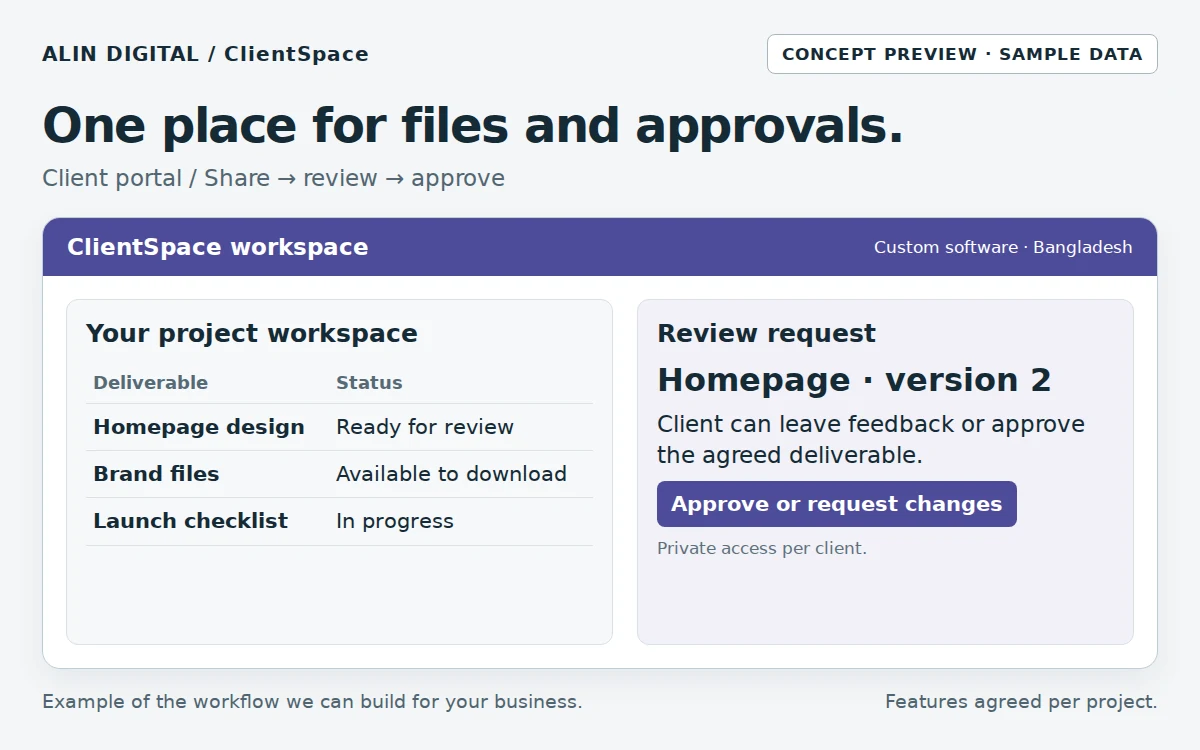
Clients find their files, check project status and approve work in a private workspace.Open the full-size preview ↗
Clients find their files, check project status and approve work in a private workspace.Concept interface · sample data

From input to outcome

  1. Invite the authorised client contact
  2. Show milestones and agreed deliverables
  3. Share a controlled file version
  4. Record an explicit approval or change request
  5. Archive and export completed work

Measure progress: Pending approvals; revision turnaround; access test results; support requests.

The illustration is a concept demo. This is a custom development service; scope, hosting, API fees, security, testing and support are agreed per project.

Compare all 10 software services →
Full scope, deliverables, workflow and FAQs
SERVICE OVERVIEW

What to expect

Client portals for updates, files and requests: secure login, project status and shared documents for agencies and service firms.

Why it matters

Why your business may need
Client Portals

Email threads bury deliverables. A small portal makes status obvious and reduces back-and-forth.

Premium feel

Clients see you as organized.

Fewer status pings

The board answers “where are we?”.

File clarity

Latest version lives in one place.

What we do

What is included in
the service.

We shape the scope around the actual business problem. These are the core capabilities available within this service.

Included capabilities — final scope is agreed for each project.
Service componentWhat it includes
Client loginPer-client access.
Project statusPhases you define.
File sharingUploads/downloads where scoped.
Request / ticket notesSimple comment thread.
Admin sideYour team updates in minutes.
NotificationsEmail/WA when something changes (scoped).
How it works

A clear process from
problem to delivery.

We keep the process understandable so you know what is happening, why it matters and what comes next.

Step 1

Define what clients must see

Status, files, invoices link — keep it lean.

Step 2

Design portal IA

Mobile-friendly.

Step 3

Build & pilot

One friendly client first.

Step 4

Roll out

Invite others, retire chaotic folder sharing.

What you receive

Clear deliverables.
No vague package language.

  • ✓Portal scope
  • ✓Client + admin UIs
  • ✓Auth setup
  • ✓Pilot feedback notes
  • ✓Handover
Best fit

This service is especially useful for:

Agencies and studiosConsultancies with ongoing retainersTeams sharing many files per client
Business value

What the work is
designed to improve.

These are practical outcomes the service is designed to support. Exact results depend on your market, offer, execution and other business factors.

↗

Less chaos

One login beats ten Drive links.

↗

Trust

Transparent progress.

↗

Upsell-ready

Clients experience your ops quality.

FAQ

Questions before
you get started.

These answers are meant to make the service easier to understand before a consultation.

Can clients pay inside the portal?+

Payments are optional and scoped; many portals start with status + files only.

Is this a full project-management SaaS?+

No — a focused portal for your delivery style.

CREATIVE • DIGITAL • BANGLADESH-FOCUSED

Not sure what you need yet?

Tell us the business problem. We can help identify whether this service—or a combination of services—is the right direction.

Start a Conversation ↗support@alindigital.com
Talk to Alin Digital

Ready to discuss
Client Portals?

Send us a few details about your project. Your enquiry will be tagged with this service automatically so our team can respond with the right context.

Dhaka office
Road 18, Sector 10, Uttara Model Town, Dhaka, Bangladesh (Temporary office)We are preparing to move to a permanent office. The new address will be announced later. Please confirm a meeting on WhatsApp before visiting.
WhatsApp: +880 1336-339955
SERVICE ENQUIRY

Tell us about your project

Complete the form and we’ll reply with the next practical step.