Skip to content
Home›Services›Business Software & Internal Tools
Internal tools • Ops • Less spreadsheet chaos

Business Software & Internal Tools

Turn one request-and-approval process into a small shared tool with clear roles.

Creative & digital•Bangladesh-focused delivery
Your working screenINTERACTIVE EXAMPLE

Move one sample item through the workflow

SAMPLE-104

New request

Working interaction example with sample data. Final features are agreed for your project.

THE WORK. THE BENEFIT. THE CHECK.

See what changes for you

Internal requests depend on scattered messages and repeated manual checks.

Included work and intended benefits; final scope is agreed before starting.
What we build or prepareWhat it helps you doWhat you can check
Ops trackersJobs, tasks, deliveries or cases with clear status.Review a representative sample of: Ops trackers
Approval flowsLeave, expenses or content — simple submit → approve.Review a representative sample of: Approval flows
Admin panelsStaff-only screens behind login.Review a representative sample of: Admin panels
YOUR DIGITAL GROWTH ROUTE

From the problem to a useful result

Your businessOne agreed goal
  1. Spot the problem

    Internal requests depend on scattered messages and repeated manual checks.

  2. Build the right piece

    Turn one request-and-approval process into a small shared tool with clear roles.

  3. Receive useful work

    Workflow brief · Tool scope

  4. Check the improvement

    Unassigned requests; approval delay; re-entry errors.

Know what you are buying before you commit

Review a relevant example, agree the deliverables and test the key task. Hosting, integrations, ongoing support and recurring fees are discussed separately.

Discuss my requirement ↗
Detailed planning and software guidance

YOUR BUSINESS / A CLEAR REASON TO INVEST

Why this service may be the right next step

Internal requests depend on scattered messages and repeated manual checks. Turn one request-and-approval process into a small shared tool with clear roles.

Start with the bottleneck you can describe and verify. The useful question is not how many features can be added, but which customer or team task becomes clearer, quicker or more reliable. We agree that task before proposing the work.

01 / SERVICE INFOGRAPHIC

What happens between your request and the result

  1. Pick one painful workflow

    We refuse to boil the ocean on day one.

  2. Sketch screens & rules

    Agree fields, roles and “done”.

  3. Build a usable first version

    Real users, real data sample.

  4. Harden & hand over

    Access, backups note, small change window.

This is a proposed working process. Timing, responsibilities and acceptance checks are agreed for your project.

02 / DIGITAL GROWTH MAP

A visible link between the work and the benefit

  1. The starting problem

    Internal requests depend on scattered messages and repeated manual checks.

  2. The work we agree

    Turn one request-and-approval process into a small shared tool with clear roles.

  3. What you receive

    Workflow brief · Tool scope · Working web tool · Login roles

  4. How to judge the benefit

    Unassigned requests; approval delay; re-entry errors.

For a business owner

Connect the work to a real operational or customer-facing issue. Choose the first improvement, name the person who will keep it up to date, and agree what would count as a useful result.

Unassigned requests; approval delay; re-entry errors.
For an independent professional

A clearer offer, professional presentation and an easier enquiry or working process can support a personal practice too. Use only the parts relevant to your work. A personal portfolio does not automatically need inventory, a CRM or paid advertising; start with the customer task you actually have.

03 / WHY WORK WITH ALIN DIGITAL

A clear process from first conversation to handover

Scope you can review

Know the deliverables, exclusions and approval points before the build. Ask which accounts, files and access remain yours.

A sample before a full rollout

Review a relevant sample or pilot against your task. Approve the direction before repeating it across the project.

Checks that match the job

Test the customer journey and agreed outputs. A visual approval alone does not establish that forms, calculations or integrations work.

A practical handover

Agree who maintains the result, what instructions are included and how support requests or changes are handled.

Agree the measures before work begins and review the result against the starting point. Market conditions, your offer and ongoing upkeep also affect rankings, sales and professional outcomes.

Discuss your starting point →

OpsBoard / Bangladesh

How the software supports daily work

A spreadsheet becomes fragile when several people change the same status, copy rows into separate files and ask in chat which version is correct. That is a workflow problem rather than proof that the business needs a full ERP. Choose one recurring process with a clear start and finish: an expense request, a delivery checklist, a content approval or a service job. An internal tool should remove repeated coordination work while preserving a simple way to correct mistakes.

Map the current process with the staff who perform it, not only the person buying software. List inputs, decisions and exceptions. If a request can be returned for correction, include that state. If the approver is absent, define a substitute. A beautiful dashboard that cannot handle these ordinary exceptions will push work back into private messages.

Use the smallest useful data model: request number, requester, category, supporting note, current owner, status and timestamps. Keep a change history for important decisions. Avoid uploading sensitive documents unless the workflow requires them and access has been agreed. Exported files need the same care as records inside the application.

Pilot with one team and compare a normal working week before and after. Count requests completed, avoidable re-entry and unresolved exceptions. Do not call the project successful because the software was delivered. Success means staff can complete the workflow and management can recover its records if the supplier changes.

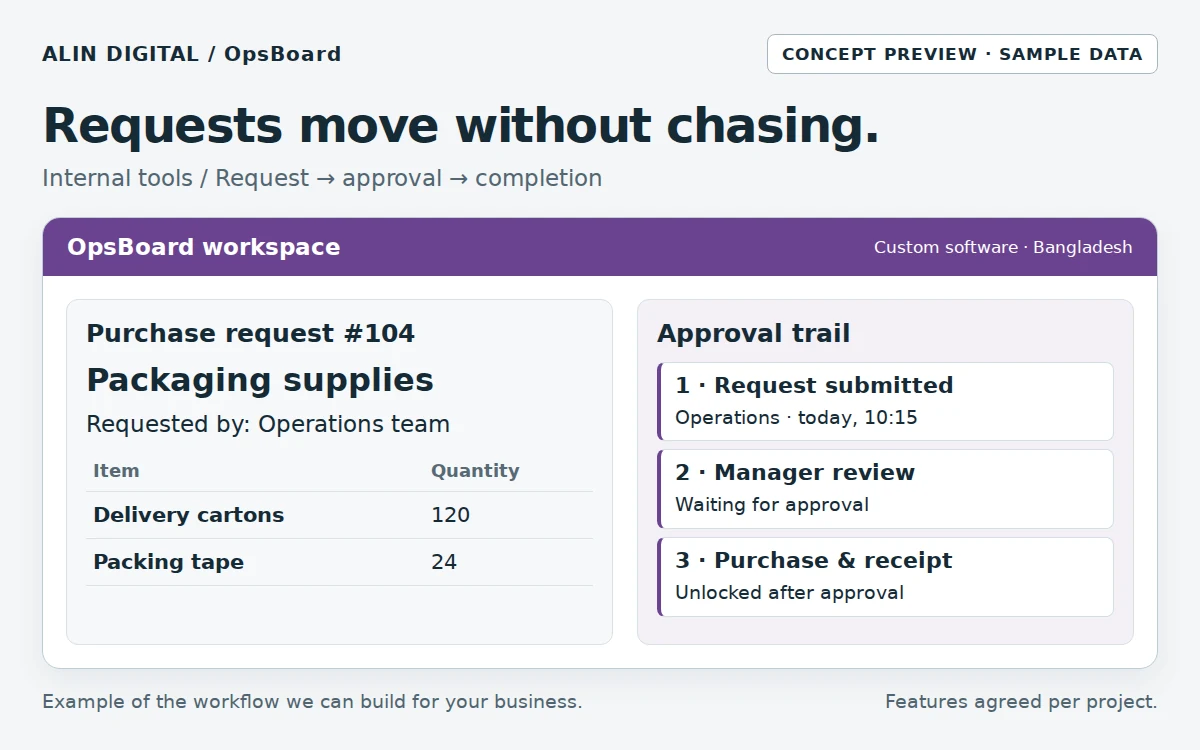
Staff submit a request; the right manager approves it; the team tracks completion.Open the full-size preview ↗
Staff submit a request; the right manager approves it; the team tracks completion.Concept interface · sample data

From input to outcome

  1. Submit a structured request
  2. Validate the required details
  3. Approve or return with a reason
  4. Complete the action
  5. Export and review the audit trail

Measure progress: Completion time; re-entry count; unresolved exceptions; staff adoption.

The illustration is a concept demo. This is a custom development service; scope, hosting, API fees, security, testing and support are agreed per project.

Compare all 10 software services →
Full scope, deliverables, workflow and FAQs
SERVICE OVERVIEW

What to expect

Custom internal tools and lightweight business software: trackers, approvals, ops boards and admin panels without a full ERP project.

Why it matters

Why your business may need
Business Software & Internal Tools

Not every problem needs an ERP. Many BD teams need a few reliable screens that replace fragile sheets and group chats.

Faster than a full ERP

Ship the workflow you need in weeks, not a year-long rollout.

Your rules, not a vendor’s

Statuses, fields and permissions match your office.

Owns your data

You keep the tool and the records.

What we do

What is included in
the service.

We shape the scope around the actual business problem. These are the core capabilities available within this service.

Included capabilities — final scope is agreed for each project.
Service componentWhat it includes
Ops trackersJobs, tasks, deliveries or cases with clear status.
Approval flowsLeave, expenses or content — simple submit → approve.
Admin panelsStaff-only screens behind login.
ExportsCSV/Excel when accounts need a copy.
Mobile-friendly UIWorks on phones your team already use.
Scoped integrationsForms, email or WhatsApp alerts where useful.
How it works

A clear process from
problem to delivery.

We keep the process understandable so you know what is happening, why it matters and what comes next.

Step 1

Pick one painful workflow

We refuse to boil the ocean on day one.

Step 2

Sketch screens & rules

Agree fields, roles and “done”.

Step 3

Build a usable first version

Real users, real data sample.

Step 4

Harden & hand over

Access, backups note, small change window.

What you receive

Clear deliverables.
No vague package language.

  • ✓Workflow brief
  • ✓Tool scope
  • ✓Working web tool
  • ✓Login roles
  • ✓Export path
  • ✓Handover note
Best fit

This service is especially useful for:

Teams living in Google SheetsOwners who want control without ERP costOffices with one clear ops bottleneck
Business value

What the work is
designed to improve.

These are practical outcomes the service is designed to support. Exact results depend on your market, offer, execution and other business factors.

↗

Less chaos

One place for the workflow that currently lives in chat.

↗

Auditability

Who changed what — basic history where scoped.

↗

Room to grow

Add modules later instead of buying a giant suite early.

FAQ

Questions before
you get started.

These answers are meant to make the service easier to understand before a consultation.

Will you build us a full ERP?+

Heavy ERP/POS product builds are Partner Delivery. This service is for focused internal tools we can ship with you.

Can inventory or booking be included?+

Yes as modules — or see our dedicated Inventory Lite and Booking Systems pages if that is the main need.

Do we need an app store app?+

Usually a mobile-friendly web tool is enough and cheaper to maintain.

CREATIVE • DIGITAL • BANGLADESH-FOCUSED

Not sure what you need yet?

Tell us the business problem. We can help identify whether this service—or a combination of services—is the right direction.

Start a Conversation ↗support@alindigital.com
Talk to Alin Digital

Ready to discuss
Business Software & Internal Tools?

Send us a few details about your project. Your enquiry will be tagged with this service automatically so our team can respond with the right context.

Dhaka office
Road 18, Sector 10, Uttara Model Town, Dhaka, Bangladesh (Temporary office)We are preparing to move to a permanent office. The new address will be announced later. Please confirm a meeting on WhatsApp before visiting.
WhatsApp: +880 1336-339955
SERVICE ENQUIRY

Tell us about your project

Complete the form and we’ll reply with the next practical step.