Skip to content
Home›Services›Know your stock. Keep sales organised.
Stock • SKUs • Simple movement

Know your stock. Keep sales organised.

See incoming products, recorded sales and remaining stock in one place. Spot low stock before planning your next purchase.

Creative & digital•Bangladesh-focused delivery
StockPilot / InventoryINTERACTIVE EXAMPLE
Canvas bag · SAMPLE-01

18pieces available

Try receiving stock or recording a sale.
Reorder point 10Latest movement —

Working interaction example with sample data. Final features are agreed for your project.

THE WORK. THE BENEFIT. THE CHECK.

See what changes for you

Stock is updated late and sales staff cannot trust the available quantity.

Included work and intended benefits; final scope is agreed before starting.
What we build or prepareWhat it helps you doWhat you can check
Product list and SKUFind the right item without searching several sheets.Search a sample SKU and confirm the item.
Stock in and stock outSee the available quantity change when a receipt or sale is recorded.Reconcile a receipt and a sale against the remaining count.
Low-stock listKnow which items need a purchase review before the next order.Set a threshold and test a quantity below it.
YOUR DIGITAL GROWTH ROUTE

From the problem to a useful result

Your businessOne agreed goal
  1. Spot the problem

    Stock is updated late and sales staff cannot trust the available quantity.

  2. Build the right piece

    Record agreed product identifiers, stock movements and low-stock thresholds.

  3. Receive useful work

    Product schema · Inventory app

  4. Check the improvement

    Reconciled stock; unexplained adjustments; low-stock exceptions.

Know what you are buying before you commit

Review a relevant example, agree the deliverables and test the key task. Hosting, integrations, ongoing support and recurring fees are discussed separately.

Discuss my requirement ↗
Detailed planning and software guidance

YOUR BUSINESS / A CLEAR REASON TO INVEST

Why this service may be the right next step

Stock is updated late and sales staff cannot trust the available quantity. Record agreed product identifiers, stock movements and low-stock thresholds.

Start with the bottleneck you can describe and verify. The useful question is not how many features can be added, but which customer or team task becomes clearer, quicker or more reliable. We agree that task before proposing the work.

01 / SERVICE INFOGRAPHIC

What happens between your request and the result

  1. Clean a starter product list

    Categories and units.

  2. Set rules

    Who can adjust stock.

  3. Build & import

    Pilot one store/warehouse.

  4. Train & stabilize

    Week-one support.

This is a proposed working process. Timing, responsibilities and acceptance checks are agreed for your project.

02 / DIGITAL GROWTH MAP

A visible link between the work and the benefit

  1. The starting problem

    Stock is updated late and sales staff cannot trust the available quantity.

  2. The work we agree

    Record agreed product identifiers, stock movements and low-stock thresholds.

  3. What you receive

    Product schema · Inventory app · Import template · Roles

  4. How to judge the benefit

    Reconciled stock; unexplained adjustments; low-stock exceptions.

For a business owner

Connect the work to a real operational or customer-facing issue. Choose the first improvement, name the person who will keep it up to date, and agree what would count as a useful result.

Reconciled stock; unexplained adjustments; low-stock exceptions.
For an independent professional

A clearer offer, professional presentation and an easier enquiry or working process can support a personal practice too. Use only the parts relevant to your work. A personal portfolio does not automatically need inventory, a CRM or paid advertising; start with the customer task you actually have.

03 / WHY WORK WITH ALIN DIGITAL

A clear process from first conversation to handover

Scope you can review

Know the deliverables, exclusions and approval points before the build. Ask which accounts, files and access remain yours.

A sample before a full rollout

Review a relevant sample or pilot against your task. Approve the direction before repeating it across the project.

Checks that match the job

Test the customer journey and agreed outputs. A visual approval alone does not establish that forms, calculations or integrations work.

A practical handover

Agree who maintains the result, what instructions are included and how support requests or changes are handled.

Agree the measures before work begins and review the result against the starting point. Market conditions, your offer and ongoing upkeep also affect rankings, sales and professional outcomes.

Discuss your starting point →

StockPilot / Bangladesh

How the software supports daily work

Inventory software tracks what is held and how it moves. A POS system handles the selling workflow at the counter, and may also manage receipts, payment devices and returns. Those are related but different responsibilities. A Bangladesh retailer should list daily tasks before choosing a product. If the main problem is stock visibility across a storeroom and a small shop, a focused inventory tool may be sufficient. If checkout operations are the problem, inventory alone is not the answer.

Create a clean product catalogue before importing balances. Give every sellable variant its own identifier where needed; colour or size variants should not accidentally share one quantity. Define units, opening balance, storage location and who may adjust stock. Treat adjustments as movements with a reason rather than silently overwriting the number.

Run a physical count on a sample and reconcile discrepancies. Include a purchase, a transfer, a damaged item, a return and a correction. If simultaneous users change stock, test that quantities remain consistent. Agree whether negative stock is blocked or flagged. Low-stock alerts are useful only when the underlying quantities are trustworthy.

A lightweight tool is not a replacement for full accounting, statutory reporting or an offline-capable retail POS. Clarify integrations and their ownership before promising synchronisation. Start with a small catalogue and a daily reconciliation routine; add branches or barcode workflows only after the basic stock movements work reliably.

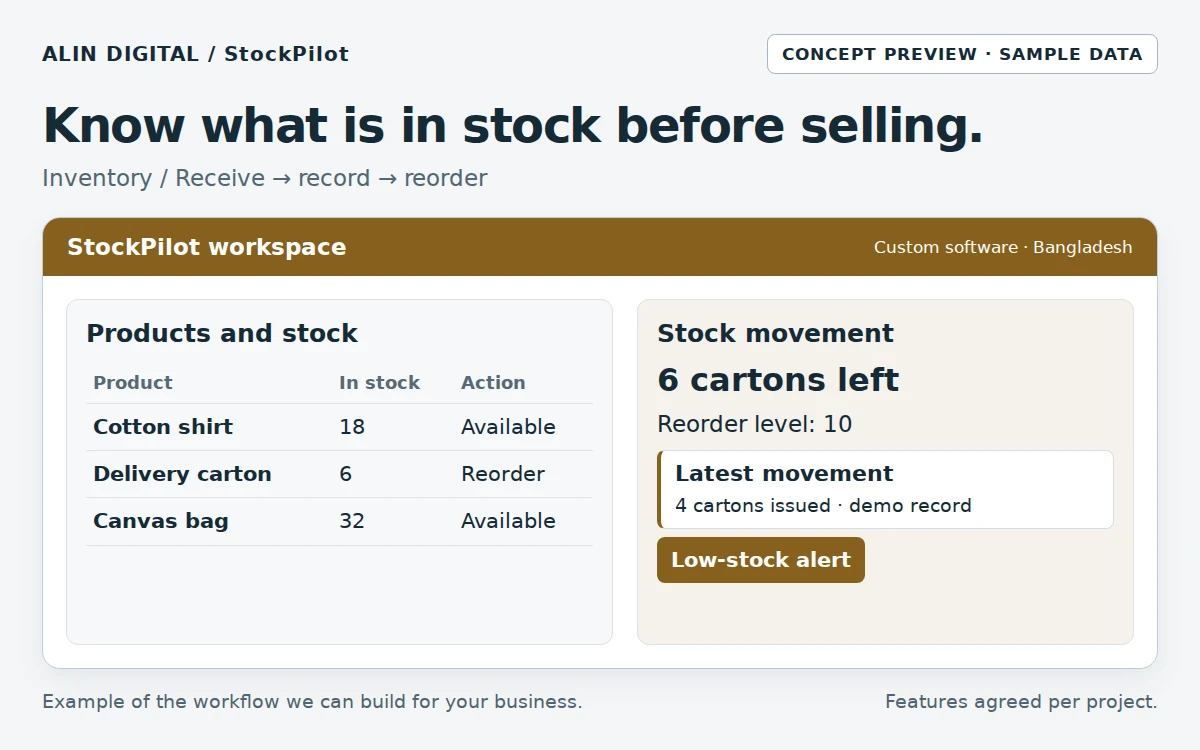
Track quantities, stock movements and low-stock items before accepting another order.Open the full-size preview ↗
Track quantities, stock movements and low-stock items before accepting another order.Concept interface · sample data

From input to outcome

  1. Create products and variants
  2. Record opening balances
  3. Log every receipt and issue
  4. Count and reconcile discrepancies
  5. Review low-stock and export reports

Measure progress: Count discrepancies; unexplained adjustments; negative balances; stock-out incidents.

The illustration is a concept demo. This is a custom development service; scope, hosting, API fees, security, testing and support are agreed per project.

Compare all 10 software services →
Full scope, deliverables, workflow and FAQs
SERVICE OVERVIEW

What to expect

Inventory lite software: SKUs, stock levels, basic in/out movements and low-stock alerts for small BD businesses.

Why it matters

Why your business may need
Know your stock. Keep sales organised.

Full ERPs are heavy. Many retailers need a trustworthy count and a low-stock signal first.

Know what you have

Stop selling ghosts.

Simple movements

In, out, adjust — with a note.

Grow later

Can connect to POS/ERP partners when you outgrow lite.

What we do

What is included in
the service.

We shape the scope around the actual business problem. These are the core capabilities available within this service.

Included capabilities — final scope is agreed for each project.
Service componentWhat it includes
Product listSKU, name, unit, reorder level.
Stock on handPer location if scoped.
Movements logWho changed what.
Low-stock listDaily glance for purchasing.
CSV import/exportStart from your sheet.
Phone-friendlyCheck stock on the floor.
How it works

A clear process from
problem to delivery.

We keep the process understandable so you know what is happening, why it matters and what comes next.

Step 1

Clean a starter product list

Categories and units.

Step 2

Set rules

Who can adjust stock.

Step 3

Build & import

Pilot one store/warehouse.

Step 4

Train & stabilize

Week-one support.

What you receive

Clear deliverables.
No vague package language.

  • ✓Product schema
  • ✓Inventory app
  • ✓Import template
  • ✓Roles
  • ✓Handover
Best fit

This service is especially useful for:

Small retail and wholesaleWorkshops with partsTeams outgrowing Excel
Business value

What the work is
designed to improve.

These are practical outcomes the service is designed to support. Exact results depend on your market, offer, execution and other business factors.

↗

Fewer stockouts

Reorder before empty.

↗

Less theft ambiguity

Adjustments leave a trail.

↗

Honest next step

When you need POS/ERP depth, we route to Partner Delivery.

FAQ

Questions before
you get started.

These answers are meant to make the service easier to understand before a consultation.

Is this a full POS?+

No. POS/ERP product builds are Partner Delivery. Inventory Lite is stock visibility first.

Multi-branch?+

Possible when scoped — start with one location if you are new to digital stock.

CREATIVE • DIGITAL • BANGLADESH-FOCUSED

Not sure what you need yet?

Tell us the business problem. We can help identify whether this service—or a combination of services—is the right direction.

Start a Conversation ↗support@alindigital.com
Talk to Alin Digital

Ready to discuss
Know your stock. Keep sales organised.?

Send us a few details about your project. Your enquiry will be tagged with this service automatically so our team can respond with the right context.

Dhaka office
Road 18, Sector 10, Uttara Model Town, Dhaka, Bangladesh (Temporary office)We are preparing to move to a permanent office. The new address will be announced later. Please confirm a meeting on WhatsApp before visiting.
WhatsApp: +880 1336-339955
SERVICE ENQUIRY

Tell us about your project

Complete the form and we’ll reply with the next practical step.