
Table to kitchen, orders in seconds
Dine-in, takeaway and online orders on one screen, slips in the kitchen instantly and the right bill at the table.

At a glance
What the restaurant system includes
- Tables
- Which tables are free and which have orders, at a glance
- Waiter app
- Waiters take orders at the table on a phone or tablet
- Kitchen slips
- Orders print or show in the kitchen instantly
- Takeaway and online
- Takeaway, phone and delivery-app orders in their own list
- Bills
- Bills by table, split bills, printing
- Market purchases
- Daily market and raw material records
- Reports
- Daily sales and best-selling items
- Payment
- bKash, Nagad, Rocket, bank transfer, Visa/Mastercard
- Approve the design before work starts
- Delivery on the date in your contract
- Your feedback at every step
Process
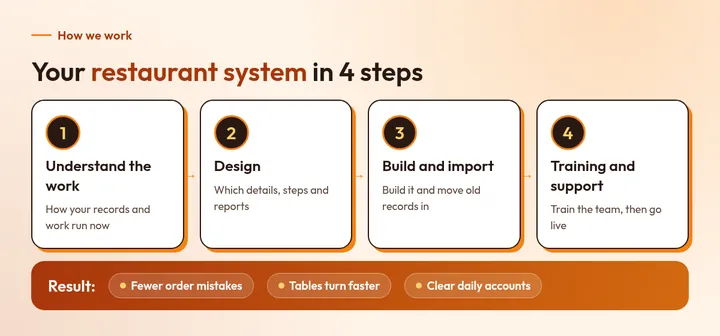
How it works, in one picture
What / Why / How
The whole idea in three parts
What it is
A restaurant system is software that runs orders, kitchen, bills and costs together.
Why you need it
At rush hour, paper orders get mixed up and bills go wrong. In a system, every order reaches the right place.
How to start
Send how many tables you have, how much takeaway and how you take orders now by WhatsApp or the form. We reply with a written plan and price, and work starts when you agree.
FAQ
Common questions
How much does a restaurant system cost?
It depends on how many tables and branches, kitchen printer or screen, and which reports you need. Tell us what you need and we send a written price. Contact us for a price.
Can I change the menu myself?
Yes. Items, prices and photos can be changed by you.
Can guests order by scanning a QR code?
If you want, tables can have a QR menu that sends orders straight into the system.
Will it work on mobile?
Yes. It runs in the browser, so it works on mobile, tablet and computer, with nothing extra to install.
Who owns the data?
You own all the data, and you can export it to Excel or CSV at any time.
Want to know more?
Get in touch with us
Send us a few details about your project. Your enquiry will be tagged with this service automatically so our team can respond with the right context.
Dhaka officeRoad 18, Sector 10, Uttara Model Town, Dhaka, Bangladesh (Temporary office)We are preparing to move to a permanent office. The new address will be announced later. Please confirm a meeting on WhatsApp before visiting.
WhatsApp: +880 1336-339955